
ConfigCap Pulse
Change and issue summaries
Core output: Show relevant changes, open issues and next actions for the agreed process.
Review moduleThe ConfigCap platform
Our approach brings together process maps, source records, change summaries and professional review. The capabilities below describe that approach; they are not an offer of self-service software. Any software access or integration is confirmed separately.
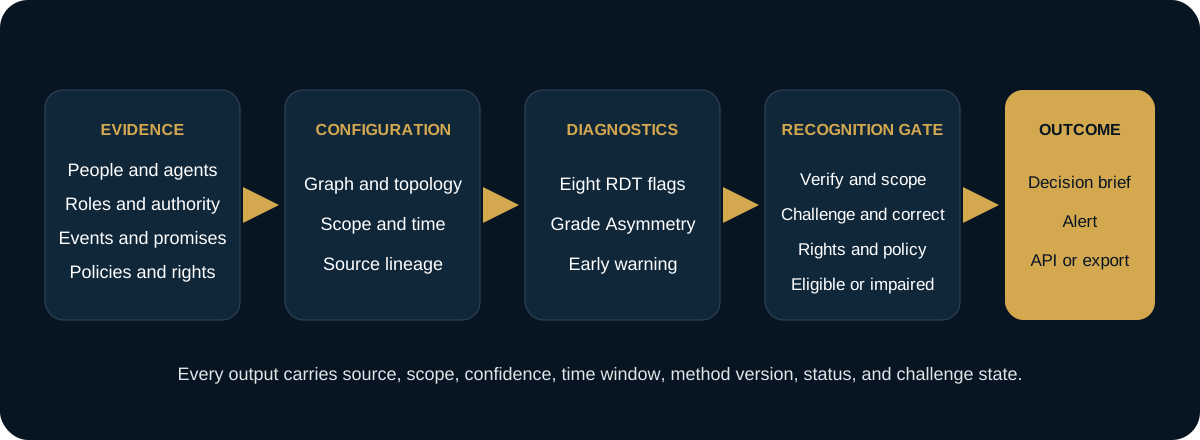
One evidence flow
Process maps show how the work fits together. Current source records and change summaries help your team understand what changed and what needs attention.
Change and issue summaries
Core output: Show relevant changes, open issues and next actions for the agreed process.
Review modulePeople, systems and responsibility map
Core output: Make relationships and dependencies easier to understand.
Review moduleRecord history and use checks
Core output: Track sources, changes, permissions and whether a record is still fit for its intended use.
Review moduleComparison context
Core output: Explain the reference group, assumptions and limitations behind any comparison.
Review moduleConnections to other systems
Core output: Describe how a future or specifically agreed integration would exchange defined records. Do not assume a public API is available.
Review moduleOngoing professional review
Core output: Turn review findings into clear responsibilities and follow-up within the agreed service.
Review moduleDeployment boundary
The service engagement determines which tools are needed. Design-partner modules are limited to agreed development work; research programs are still under study; a deferred interface is not publicly available. No client workspace or API access is included unless separately confirmed.
Every displayed state requires visible source, scope, time window, method version, status, uncertainty, and challenge state. These screens are illustrative design data, not live client telemetry.